

· 12 min read
GitOps with the Amazon EKS Capabilities platform
Argo CD and Kargo in practice - benefits, trade-offs, and real-world lessons
Why did we start researching this topic?
At Code Factory, we often help our clients design and implement AWS infrastructures. Within this area, we frequently work with EKS-based solutions. Whether it’s a startup needing a small-scale, dynamic architecture for a new idea or the migration of an already established system, our goal is always to create CI/CD processes where applications are versioned and deployed automatically, usually across multiple environments.
This is why our interest was sparked when, at the end of 2025 in November, AWS introduced a new feature called EKS Capabilities. This is a new component of the EKS service that, among many other things, allows us to run Argo CD as a managed component on EKS.
Our CI/CD processes are not typically built around a GitOps approach, so besides exploring a new AWS and EKS-native solution, we also wanted to see where this direction is heading and how much it has evolved in recent years.
What is GitOps?
GitOps is an approach where the desired state of a system ( a demo application in our case ) is defined declaratively in a Git repository. In this model, the repository not only stores the source code, but also the deployment configuration and its version.
Instead of using a traditional deployment pipeline, a controller or operator (for example, Argo CD) continuously compares the actual state of the system with the desired state defined in Git. If a difference is detected, the controller automatically reconciles it and brings the system back to the desired state.
This approach can be appealing for several reasons:
- Transparency: All changes are tracked in one place: Git.
- Reproducibility: The system can be recreated at any time based on the repository.
- Consistency: The controller continuously monitors drift and restores the system to its defined state.
- Visual interface: Tools like Argo CD and Kargo provide clean visual interfaces where deployed versions and potential issues can be easily observed.
However, there are also downsides:
- Complexity: A simple pipeline is replaced by multiple components (such as Argo CD and Kargo), which can make the system more complex and sometimes more expensive.
- Familiarity: Developers and operators are often more accustomed to traditional CI/CD workflows.
- Rollback: Without tools like Kargo, rolling back to a previous version can be inconvenient, as it typically requires creating a new commit, which makes the process slower and less straightforward.
- Troubleshooting: When something goes wrong, the issue may appear across multiple components. This can make debugging and resolution more difficult.
Based on our experience, although the GitOps concept is very elegant in theory, in practice, it is not always the simplest or most efficient solution. In many client environments, a traditional CI/CD pipeline is easier to understand, simpler to operate, and requires fewer platform components.
What are AWS EKS Capabilities?
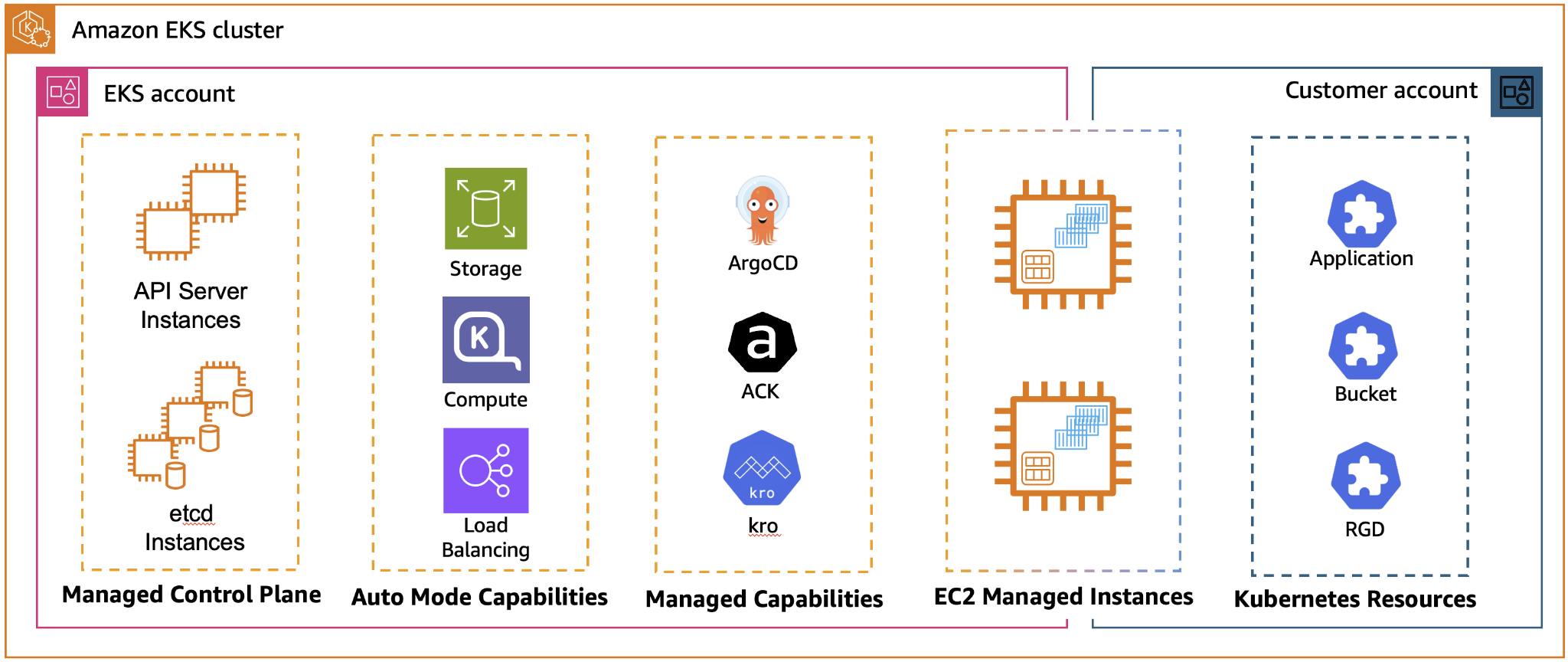
EKS Capabilities is a new concept within the Amazon EKS service that provides Kubernetes-native tools as managed services. In practice, this means that these components run as part of the EKS platform itself rather than on your own worker nodes.
Currently available capabilities include:
- Argo CD: enables GitOps-based application deployment.
- AWS Controllers for Kubernetes (ACK): allows AWS resources to be managed directly through the Kubernetes API.
- Kubernetes Resource Orchestrator (KRO): designed for orchestrating complex resources and workflows.
In a traditional Kubernetes setup, tools like these typically need to be installed, maintained, and operated by the platform team. With EKS Capabilities, however, much of that operational responsibility shifts to AWS. Instead of managing installation, upgrades, and scaling ourselves, we only need to focus on configuring the components.
Another advantage is the tighter integration with AWS services. For example, when using Argo CD through EKS Capabilities, the web interface can use native AWS authentication via AWS IAM Identity Center. This allows user access to be managed centrally alongside other AWS services.
Our solution and how we built it
To start, we wanted to establish a simple process, so we created a very simple demo application. Our goal was to have an application that is built in versioned releases and, after the build process, can be easily deployed to multiple environments. Another important requirement was that deployments should be manageable through a visual interface, that changes should be tracked in Git, and that it should be easy to roll back to a previous version if necessary.
For this solution, we created three repositories:
1. Infrastructure repo
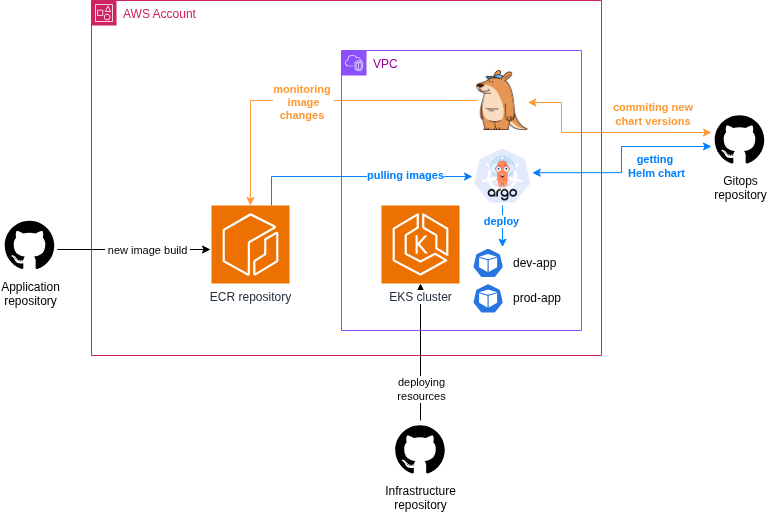
This is where we placed all the IaC code used for provisioning the required AWS infrastructure. For this purpose, we used OpenTofu and Terragrunt. To keep things simple, the resources required for the project, such as the VPC, EKS cluster, and ECR, were deployed using public modules. The Kargo installation was also performed through Terragrunt using a Helm chart. The overall architecture looked roughly as follows:
In the Argo CD Capability configuration, we assigned permissions to the already existing users and teams in our Identity Center. We left everything else in the default setting.
 argo_configuration = {
   argo_cd = {
     aws_idc = {
       idc_instance_arn = "arn:aws:sso:::instance/ssoins-000000000000"
     }
     namespace = "argocd"
     rbac_role_mapping = [{
       role = "ADMIN"
       identity = [
         # Admin Group Users
         {
           id   = "00000000-0000-0000-0000-000000000000"
           type = "SSO_GROUP"
         }
       ]
     }]
   }
 }
2. Application repo
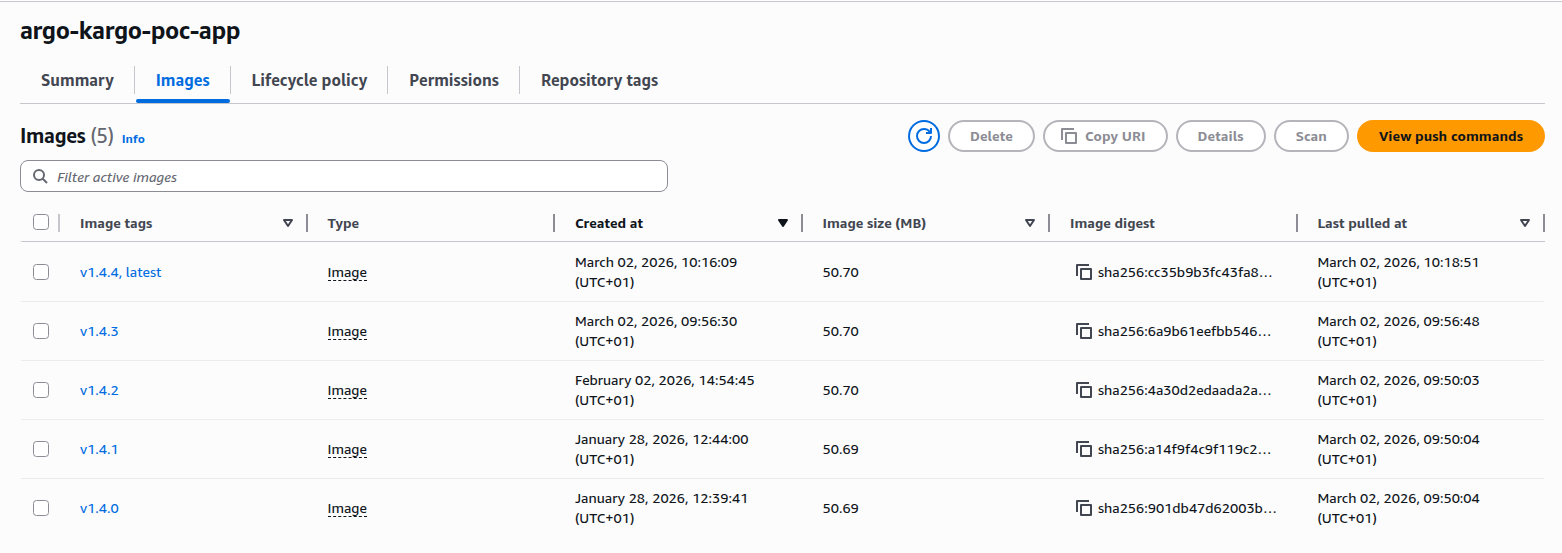
This repository contained a simple application codebase. A GitHub workflow automatically built and pushed a new image to an ECR image repository whenever a new version tag was created. From this point on, the goal was for Kargo to automatically detect new images and deploy them to Kubernetes using Argo CD.
3. Gitops repo
Since we use Helm charts in almost all of our Kubernetes projects, we decided to apply the same approach here as well. As a result, this repository contains a Helm chart that includes everything required for deploying the application. In addition, the configuration files for Argo CD and Kargo are also stored here.
We found a well-structured example of this setup in the official Kargo documentation, which served as a strong foundation for our implementation. Only a few modifications were necessary, mainly to accommodate EKS-specific requirements.
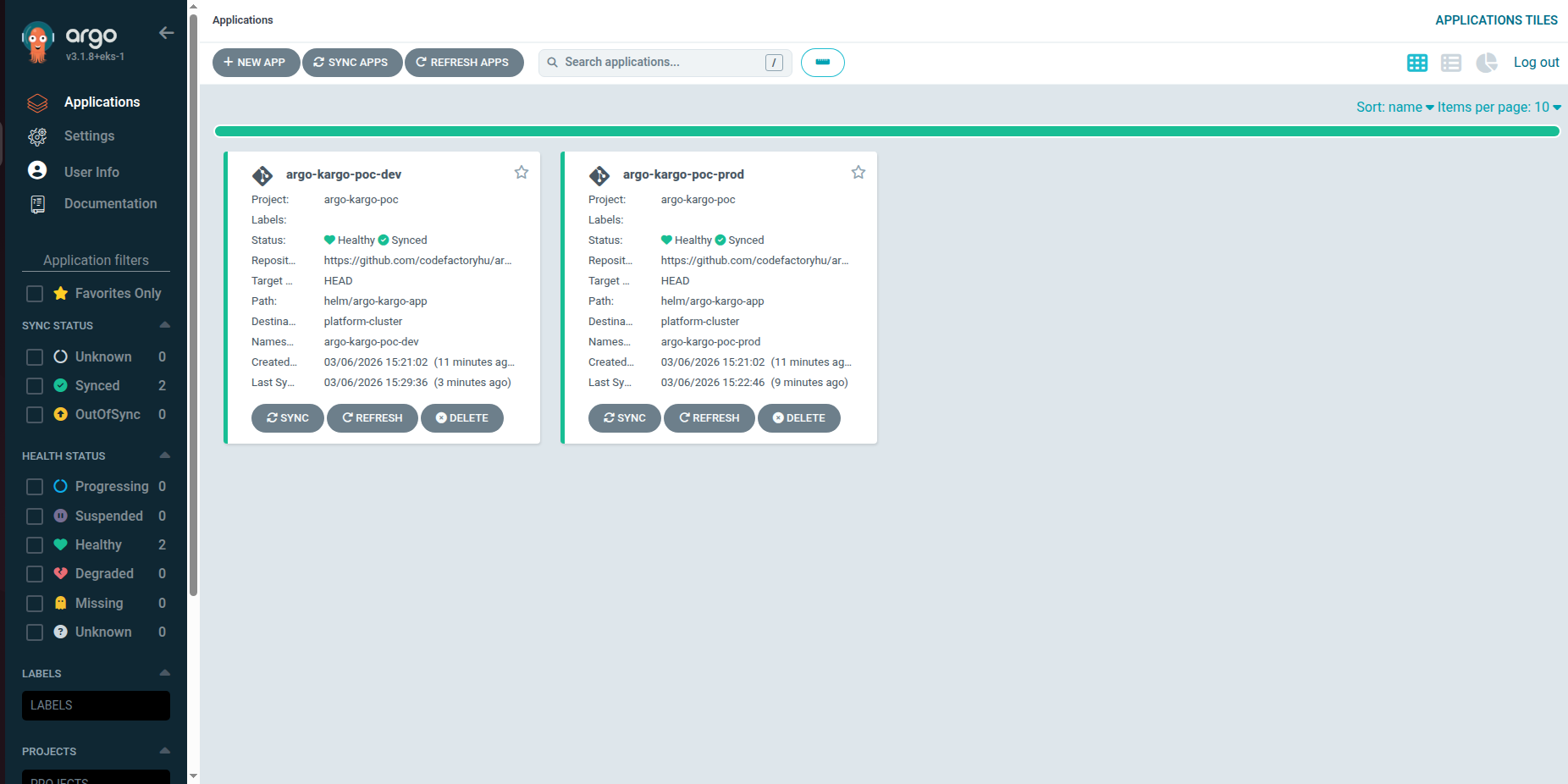
For the proper operation of Argo CD, we created the following resources:
AppProject: Defines the permissions and deployment scope of applications in Argo CD. It specifies which repositories, clusters, and namespaces applications in the project are allowed to deploy to.
apiVersion: argoproj.io/v1alpha1
kind: AppProject
metadata:
  name: <PROJECT_NAME>
  namespace: argocd
spec:
  clusterResourceWhitelist:
  - group: '*'
    kind: '*'
  destinations:
  - name: <CLUSTER_NAME>
  namespaceResourceWhitelist:
  - group: '*'
    kind: '*'
  sourceRepos:
  - <GITHUB_REPO_URL>
  sourceNamespaces:
  - argocd
  - <PROJECT_NAME>-dev
  - <PROJECT_NAME>-prod
AppSet (ApplicationSet): A component used to automatically generate multiple Application resources (the configuration required to deploy an application).
apiVersion: argoproj.io/v1alpha1
kind: ApplicationSet
metadata:
  name: <PROJECT_NAME>
  namespace: argocd
spec:
  generators:
  - list:
      elements:
      - stage: dev
      - stage: prod
  - git:
      repoURL: <SOURCE_REPO_URL>
      revision: HEAD
      directories:
      - path: env/*
  template:
    metadata:
      name: <PROJECT_NAME>-{{path.basename}}
      annotations:
        kargo.akuity.io/authorized-stage: argo-kargo-poc:{{path.basename}}
    spec:
      destination:
        namespace: <PROJECT_NAME>-{{path.basename}}
        name: <CLUSTER_NAME>
      project: <PROJECT_NAME>
      source:
        path: helm/<HELM_CHART_NAME>
        repoURL: <SOURCE_REPO_URL>
        helm:
          valueFiles:
          - "/env/{{path.basename}}/values.yaml"
          - "/env/{{path.basename}}/feature-flags.yaml"
Cluster Registration: The Kubernetes cluster is registered in Argo CD so that Argo CD can deploy and manage applications in it.
apiVersion: v1
kind: Secret
metadata:
  name:<CLUSTER_NAME>
  namespace: argocd
  labels:
    argocd.argoproj.io/secret-type: cluster
stringData:
  name: <CLUSTER_NAME>
  server: <CLUSTER_ARN>
  project: <PROJECT_NAME>
GitHub Repo Secret: This is required so that Argo CD can access the information stored in the GitHub repository.
apiVersion: v1
kind: Secret
metadata:
 name: argocd-github
 namespace: argocd
 labels:
   argocd.argoproj.io/secret-type: repository
stringData:
 type: git
 url: <GITHUB_REPO_URL>
 username: <USERNAME>
 password: <PAT_TOKEN>
 project: <PROJECT_NAME>
It looked like this in the Argo CD UI:
Similarly, Kargo uses the following resources:
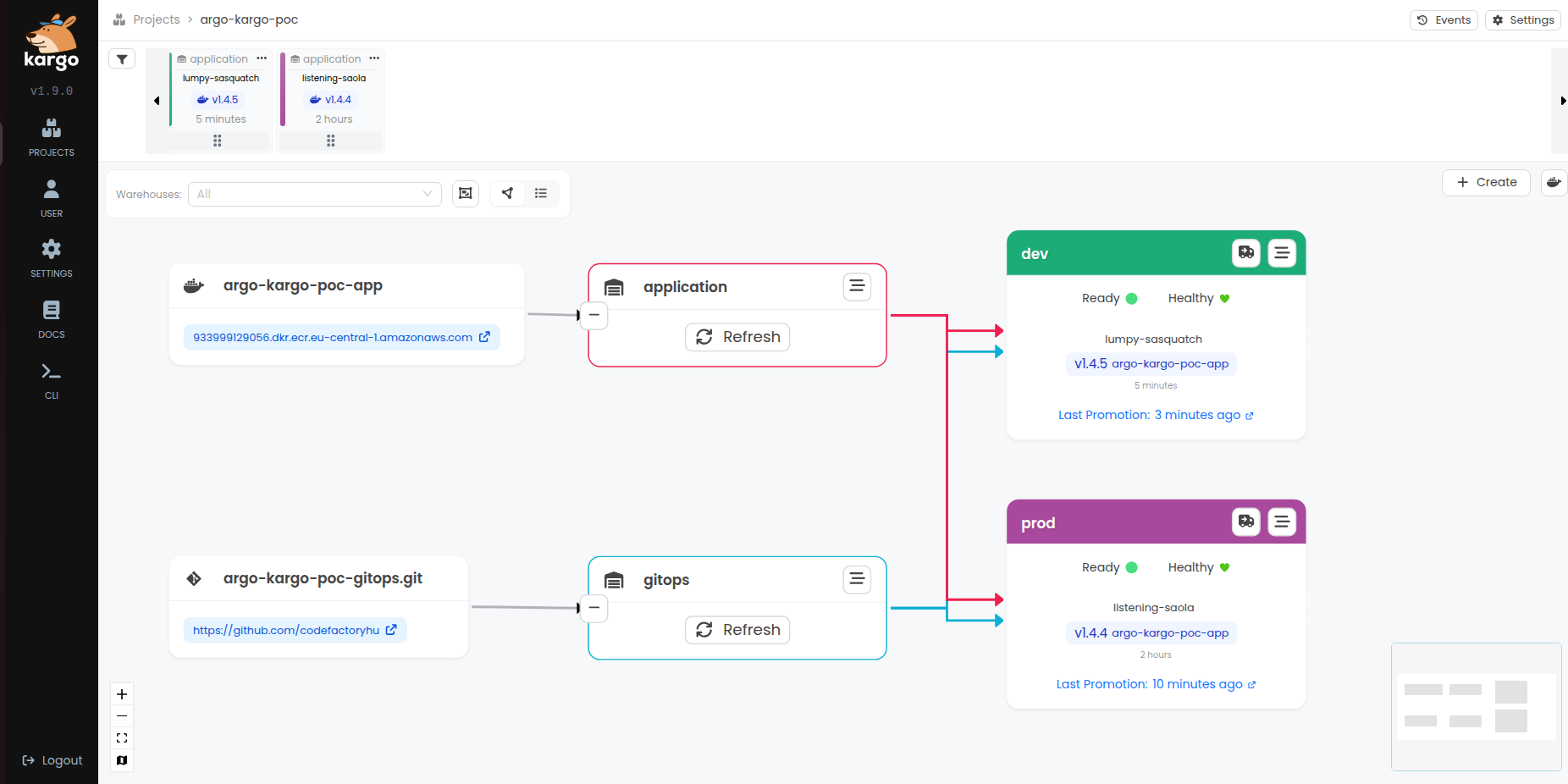
Project: Represents the deployment pipeline of an application.
apiVersion: kargo.akuity.io/v1alpha1 kind: Project metadata: name: <PROJECT_NAME> annotations: # This annotation ensures Projects (Namespaces) .. # .. are created first when deployed via Argo CD argocd.argoproj.io/sync-wave: "-1"Warehouse: Defines the source of deployment artifacts (such as container images or Git commits) and monitors them for changes.
apiVersion: kargo.akuity.io/v1alpha1 kind: Warehouse metadata: name: application namespace: <PROJECT_NAMESPACE> spec: subscriptions: - image: repoURL: <ECR_REPO_URL> imageSelectionStrategy: SemVer --- apiVersion: kargo.akuity.io/v1alpha1 kind: Warehouse metadata: name: gitops namespace: <PROJECT_NAMESPACE> spec: subscriptions: - git: branch: main commitSelectionStrategy: NewestFromBranch discoveryLimit: 20 repoURL: <GITHUB_REPO_URL>Stage: This is where we defined the different environments.
apiVersion: kargo.akuity.io/v1alpha1 kind: Stage metadata: name: dev namespace: <PROJECT_NAMESPACE> annotations: kargo.akuity.io/color: green kargo.akuity.io/argocd-context: '[{"name":"argo-kargo-poc-dev","namespace":"argocd"}]' spec: requestedFreight: - origin: kind: Warehouse name: application sources: direct: true - origin: kind: Warehouse name: gitops sources: direct: true promotionTemplate: spec: steps: - task: name: promote --- apiVersion: kargo.akuity.io/v1alpha1 kind: Stage metadata: name: prod namespace: <PROJECT_NAMESPACE> annotations: kargo.akuity.io/color: purple kargo.akuity.io/argocd-context: '[{"name":"argo-kargo-poc-prod","namespace":"argocd"}]' spec: requestedFreight: - origin: kind: Warehouse name: application sources: direct: true - origin: kind: Warehouse name: gitops sources: direct: true promotionTemplate: spec: steps: - task: name: promotePromotionTask: Defines how a new artifact is promoted from one stage to another (for example, test → production).
apiVersion: kargo.akuity.io/v1alpha1
kind: PromotionTask
metadata:
  name: promote
  namespace: <PROJECT_NAMESPACE>
spec:
  vars:
  - name: image
    value: <ECR_REPO_URL>
  - name: repoURL
    value: <SOURCE_REPO_URL>
  - name: branch
    value: main

  steps:
  - uses: git-clone
    config:
      repoURL: ${{ vars.repoURL }}
      checkout:
      - branch: ${{ vars.branch }}
        path: ./out
  - if: ${{ ctx.targetFreight.origin.name == "application" }}
    uses: yaml-update
    as: update-image
    config:
      path: ./out/env/${{ ctx.stage }}/values.yaml
      updates:
      - key: image.tag
        value: ${{ imageFrom( vars.image ).Tag }}
  - if: ${{ ctx.targetFreight.origin.name == "gitops" }}
    uses: git-clone
    config:
      repoURL: ${{ vars.repoURL }}
      checkout:
      - commit: ${{ commitFrom( vars.repoURL ).ID }}
        path: ./gitops
  - if: ${{ ctx.targetFreight.origin.name == "gitops" }}
    uses: copy
    config:
      inPath: ./gitops/base/feature-flags.yaml
      outPath: ./out/env/${{ ctx.stage }}/feature-flags.yaml
  - uses: git-commit
    as: commit
    config:
      path: ./out
      message: "${{
        ctx.targetFreight.origin.name == 'application' ?
        'updated '+ctx.stage+' application to '+imageFrom( vars.image ).Tag :
        'updates '+ctx.stage+' gitops.yaml from '+commitFrom( vars.repoURL ).ID
        }}"
  - uses: git-push
    config:
      path: ./out
  - uses: argocd-update
    config:
      apps:
      - name: a<PROJECT_NAMESAPCE>-${{ ctx.stage }}
GitHub Repo Secret: Provides authenticated access to the GitHub repository used by Kargo.
apiVersion: v1
kind: Secret
metadata:
  name: kargo-github
  namespace: <PROJECT_NAMESPACE>
  labels:
    kargo.akuity.io/cred-type: git
stringData:
  repoURL: <GITHUB_REPO_URL>
  username: <USERNAME>
  password: <PAT_TOKEN>
The result
On the Kargo UI interface, the new version automatically appears in the top left corner. We can deploy it simply using a drag-and-drop function. Within a few seconds, the new pods start running on the cluster, and the deployed version number is immediately written into the GitHub repository.
Challenges we encountered
In addition to the Argo CD and Kargo documentation, we also used the official AWS documentation to put the entire process together. Overall, setting up the system proved to be relatively straightforward.
The only significant challenge was configuring the permissions correctly. Several components needed to work together (AWS, Kubernetes, Argo CD, Kargo, and GitHub), so it was important to ensure that all the necessary access rights were properly configured. During this process we encountered a few difficulties, so we compiled a list of the permissions and settings that are essential for the system to function properly.
Argo CD ➛ EKS cluster
During the installation of the Capability, the IAM role used by Argo CD is added to the EKS access entries. As a result, Argo CD is able to communicate with the cluster and manage Kubernetes resources.
Argo CD ➛ Github repository
In order for Argo CD to access the configurations stored in the GitHub repository, we used a Personal Access Token (PAT) stored in a Kubernetes Secret.
Argo CD ➛ AWS Users
We configured this directly in the Argo CD Capability as described above, using our existing Identity Center groups. More details can be found in the AWS documentation.
Kargo ➛ ECR repository
Kargo monitors the container images stored in AWS ECR and uses them to manage artifact promotions between stages. By tracking new image tags in the repository, Kargo can automatically detect new versions and promote them through the defined environments according to the configured promotion workflow.
To allow Kargo to access the ECR repository, we configured EKS Pod Identity Association. This mechanism allows a Kubernetes ServiceAccount to assume an IAM role, which provides the necessary permissions to interact with AWS services.
The IAM role assigned to the Kargo service account includes the required ECR read permissions, such as:
- ecr:DescribeImages
- ecr:ListImages
- ecr:BatchGetImage
This approach avoids the need for storing static AWS credentials in Kubernetes secrets and follows AWS best practices for secure access management.
Kargo ➛ Github repository
Kargo executes the steps of the deployment pipeline and handles promotions between stages based on the configurations stored in the repository. In our case, we used a Kubernetes Secret to store the required GitHub Personal Access Token (PAT). Authentication can also be implemented using SSH keys or through a GitHub App. More details about these options can be found here: managing-credentials.
What do we think?
The process was successful in the sense that we were able to achieve the goals set at the beginning of the project. Deploying and versioning the application proved to be relatively easy to implement using Argo CD and Kargo. The solution allowed us to deploy the application in a versioned manner to a Kubernetes cluster across two different environments.
In addition, thanks to the visual interface of Argo CD, the deployment process became transparent and easy to follow. It was simple to see which version was running in a given environment, what changes had occurred, and whether the state of the cluster matched the desired state defined in the Git repository.
In this case, the main added value of the GitOps approach was precisely this transparency. By using Kargo, we were able to avoid manually modifying the Git repository when introducing a new version or performing a rollback. In our experience, this greatly simplifies the management of application versions and deployments. At the same time, based on our current experience, it is not yet entirely clear to us whether the additional tools, operational overhead, and potential costs associated with this approach are always proportional to the benefits it provides.
In the future, we would like to extend this experiment with additional automation steps, such as automated testing or the management of multiple environments. Another interesting direction could be exploring GitOps-based processes not only for application deployment but also for infrastructure management, for example by integrating Infrastructure as Code (IaC) solutions.
Sources
- Announcing Amazon EKS Capabilities for workload orchestration and cloud resource management
- EKS Capabilities Docs
- Argo CD docs
- Kargo Docs
- GitHub - akuity/kargo-helm: Example Kargo repo featuring helm chart and values promotion
Are you interested in this topic? Do you have any questions about the article? Book a free consultation and let’s see how the Code Factory team can help you, or take a look at our services!